

Ribbon editor
Home, Label, Data, Print, Deploy and View tabs, plus context tools that show up for the object you select. Undo and redo with clear labels.
Design and print address labels, shipping labels, product labels, name badges and barcodes on the label sheets you already own. Works offline on Windows, macOS and Linux, with 1,495 label templates built in.
Download free Find your label template
We picked the download that matches your computer. All systems are below.
Everything is a click away on the ribbon, and the tools you need appear when you select an object: text, barcode, image, shape or line. Six colour themes in light and dark are built in.
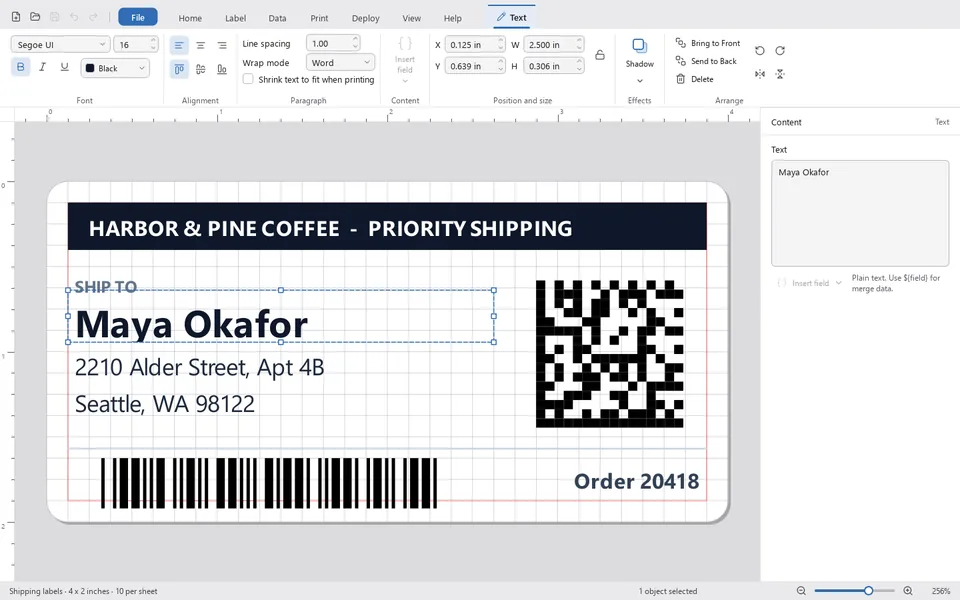
gLabels Neo is a complete desktop label maker: layout, templates, barcodes, data merge and printing.
Home, Label, Data, Print, Deploy and View tabs, plus context tools that show up for the object you select. Undo and redo with clear labels.
Objects snap to each other's edges and centres, to the label centre and to the safe area inside the margin. Hold Alt to move freely.
Avery, Online Labels, Herma, Hisago, Rayfilm and many more, in US Letter, A4 and other sizes. Missing yours? The template designer builds it in a few steps.
Code 39, EAN-13, UPC-A, POSTNET and Data Matrix built in, with text, images, lines and shapes alongside.
Import CSV or Excel into the Fill table, set quantities, preview the sheet live and print only the rows you tick.
Print to Zebra and compatible thermal printers directly with raw ZPL over USB or network, on roll label templates.
Build a single-file kiosk from any label. Operators only fill in the fields you leave open, then press Print. No install.
Graphite, Neo, Paper, Harbor, Signal and System, each in light and dark, switching live from Preferences.
Your labels and data never leave your computer. No account, no cloud, no tracking. The source code is open for anyone to read.
Put ${name}, ${street} or any field on a label, import your list, and the Fill page
shows every row beside a live preview of the sheet.
| name | city | order |
|---|---|---|
| Maya Okafor | Seattle, WA | 20418 |
| Tomas Berg | Portland, ME | 20419 |
| Priya Raman | San Francisco, CA | 20420 |
| Luca Ferri | Austin, TX | 20421 |
| Aiko Tanaka | Chicago, IL | 20422 |
| Sam Whitaker | Boulder, CO | 20423 |
Pick the part number printed on your label sheet and gLabels Neo sets the size, spacing and margins for you.
Popular sheets:
A general comparison. Features differ between products, so check the one you are considering.
| gLabels Neo | Typical online label makers | |
|---|---|---|
| Cost | Free, open source (GPL) | Often a free trial, then paid plans or fees to remove limits |
| Account | None needed | Often required to save or print |
| Works offline | Yes | Usually needs an internet connection |
| Your data | Stays on your computer | Usually stored on the vendor's servers |
| Label stock | 1,495 templates from 32 makers, plus a custom template designer | Often limited to one maker's products |
| Batch print from CSV or Excel | Yes, with live sheet preview | Varies by plan |
| Thermal printers (Zebra ZPL) | Yes, raw ZPL over USB or network | Varies |
Free for Windows, macOS and Linux. No installer needed on Windows: unzip and run.
Windows 10 and 11, 64-bit. Unzip anywhere and run bin\glabels-qt.exe.
Apple Silicon. Open the disk image and drag the app to Applications. Right-click and choose Open the first time.
Download .dmgglabels-neo-macos-arm64.dmgx86_64. Extract the archive and run ./glabels-neo/glabels-neo.
Every download is built from the public source code. See the release notes and checksums or read the source.
Yes. It is open-source software under the GPL-3.0-or-later license. There is no account, no trial, no watermark, no ads and no per-label fee.
Yes. It includes templates for Avery sheets such as 5160, 5163 and 8160, plus Online Labels, Herma, Hisago, Rayfilm and many other makers, nearly 1,500 in total. If your sheet is not listed, the Product Template Designer lets you create it.
Windows 10 and 11 (64-bit), macOS on Apple Silicon, and Linux on x86_64.
Yes. Use the Fill page to import a CSV or Excel file, choose a quantity for each row, preview the sheet and print the rows you select.
Yes. It can send raw ZPL to Zebra and compatible printers over USB or the network, and it has roll and thermal label templates.
No. Designing and printing work offline. The only network use is an optional check for new versions, which asks for your permission first.
gLabels Neo is an independent fork of gLabels. It adds a ribbon interface, colour themes, snapping and guides, the Fill page, kiosk deployment, ZPL thermal printing, an improved template designer and automatic updates. All credit for the original application goes to Jaye Evins and the gLabels contributors.
Download, pick your label sheet, and print. It is free, and it is yours.